
Freeware Windows tool
Databases Searching Tool
You have the value. D.S.T. helps you find where it lives in the SQL Server areas you are allowed to search.
D.S.T. is a local Windows tool for support and operations work. Define approved databases, tables and columns, run focused searches, schedule repeat checks, review Search Memory and export the results you need.
Why it exists
When the value is known, but the table is not.
Many real support and troubleshooting tasks start with a clue: a reference number, customer identifier, document ID, case number, email fragment or other value. The hard part is often not knowing where the system stored it.
D.S.T. turns that hunt into a controlled workflow: choose the approved scope, run the search, review the matches, keep history when it helps and export only what is useful.
Built for real support work
Useful when internal systems contain many databases and the fastest question is: where does this value appear?
Controlled by scope
Search selected databases, tables and columns instead of blindly scanning everything.
Repeatable by profile
Save lookup profiles for recurring support cases, reference checks, customer investigations and audit-style reviews.
Freeware
Why is D.S.T. free?
D.S.T. is free for personal, educational, commercial and corporate use, allowing teams to evaluate it in real lookup workflows without an account, activation or license key.
Paid help may be offered for training, setup review, Search Profile design and internal workflow implementation. The tool itself remains freeware.
Use it freely. Use it responsibly. Remember where it came from.
Human and agent workflows
Search Profiles turn repeated lookup work into something reusable.
A profile defines the approved lookup boundary: databases, tables, columns, match mode, result limits, history mode and defaults. The same profile can be used manually, by the scheduler or by a scoped agent token.
Those profiles can support both human operators and agent-assisted workflows, while keeping the search constrained to user-approved areas.
User defines access
Use credentials and SQL permissions appropriate for the environment. Read-only access is recommended for lookup work.
Profile defines scope
A Search Profile describes the allowed databases, tables, columns, limits and defaults.
Human, scheduler or agent runs lookup
The lookup can be performed through the local UI, recurring scheduler or controlled Agent API when configured by the user.
Results are reviewed
Run metadata, summaries and configured preview rows can be stored in Search Memory according to the profile's history settings. Authorized agents can read only permitted views, and users can export approved results.
Important: Agent-assisted use must remain permission-based. Do not give agents unrestricted database access. Use scoped profiles, read-only credentials and review exports before sharing them.
Interface preview
A local browser workspace for search, results and profiles.
The screenshots use generic sample values. Light and dark captures are paired with the page theme so the product is shown consistently.
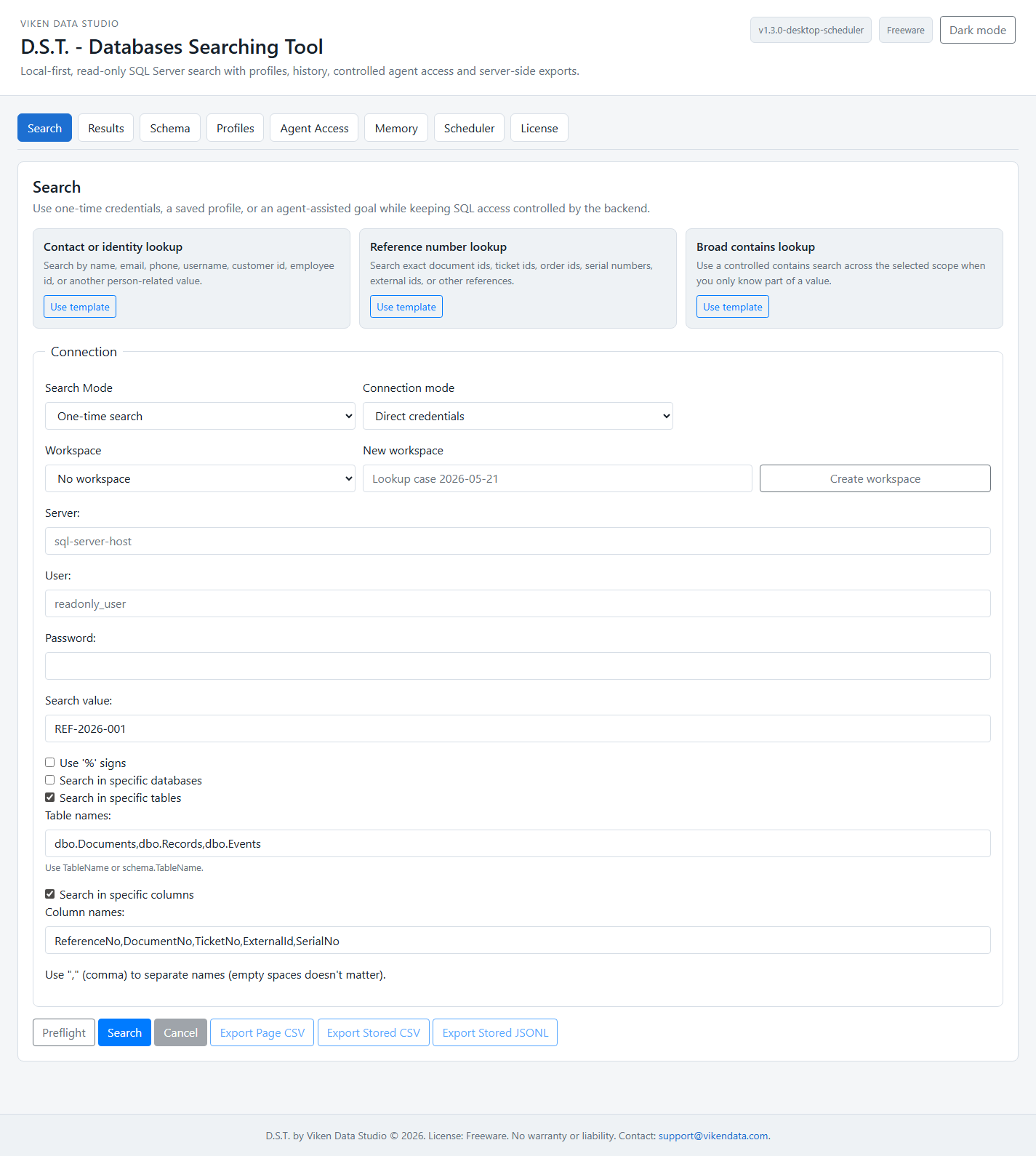
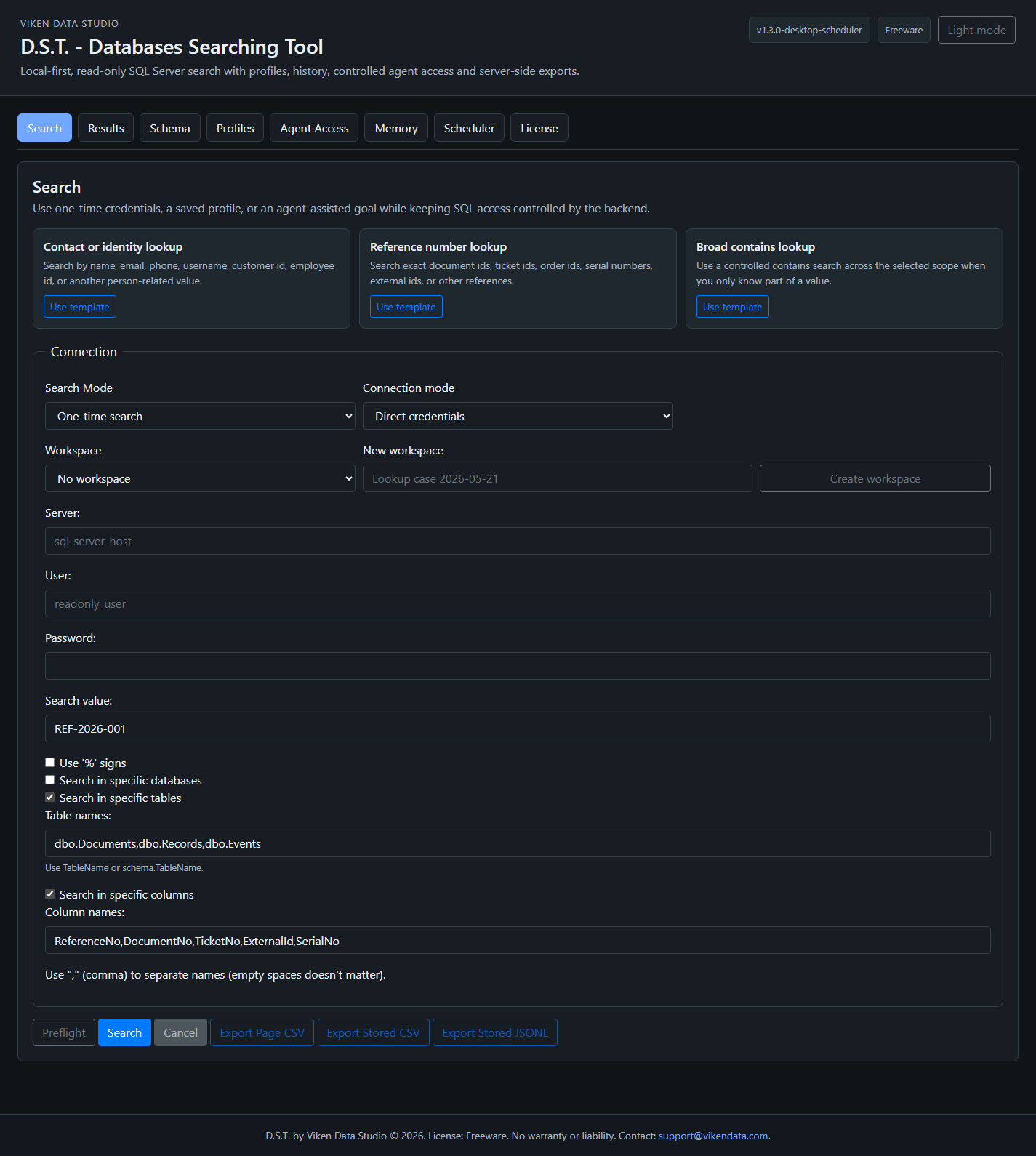
Profile-backed search
Approved databases, tables and columns are defined by Search Profiles before users or agents search.
Local desktop runtime
The product runs locally, can stay in the Windows tray and can start minimized with Windows.
Search Memory
Human, scheduler and agent runs are recorded in local history according to profile visibility rules.
Inspectable gallery
D.S.T. across the complete workflow
Open Search, Scheduler, Search Memory and Agent Access. Every thumbnail and full-size preview follows the site's light or dark theme.
What D.S.T. helps with
Focused SQL Server lookup work.
Use D.S.T. where the goal is to find, confirm and export a value from a known environment with permission.
Reference lookup
Find invoice numbers, document IDs, ticket numbers, case references and external identifiers.
Support review
Investigate recurring support cases with reusable profiles instead of rebuilding the same search every time.
Scheduled monitoring
Run recurring profile-backed searches for known values and keep the latest runs available in Search Memory.
Agent-safe access
Expose scoped search, history and scheduled run access through bearer tokens without exposing SQL credentials or raw SQL.
Boundaries
What D.S.T. is and what it is not.
The product is intentionally narrow. It is a search and review utility for approved SQL Server scopes, not a platform that tries to replace your database tools.
D.S.T. is
- A local SQL Server lookup utility.
- A controlled search workflow.
- A profile-based internal support tool.
- A scheduled search and local history tool.
- A scoped local Agent API gateway when deliberately enabled.
- A freeware Windows product with a local browser UI.
D.S.T. is not
- Not a BI platform.
- Not a full database administration suite.
- Not a replacement for SQL Server Management Studio.
- Not a permission bypass or autonomous data mining tool.
- Not a raw SQL endpoint for agents.
- Not something to expose directly to the public internet.
Safe use
Use it only where you have permission.
D.S.T. is freeware, but it is still a database inspection tool. Treat it like any internal data utility.
- Use D.S.T. only against systems you own, administer or have explicit permission to inspect.
- Prefer read-only SQL accounts for lookup workflows.
- Keep profiles scoped to the databases, tables and columns needed for the task.
- Give agents only scoped bearer tokens, never SQL credentials.
- Do not expose internal database tools directly to the public internet.
- Review exported files before sharing them and store them according to internal data policy.
- Do not publish screenshots that reveal hostnames, credentials, private database names or live customer data.
D.S.T. FAQ
Common questions before downloading.
What is Databases Searching Tool?
D.S.T. is a local Windows SQL Server lookup tool. It helps users search approved databases, tables and columns, schedule recurring searches, review Search Memory and export useful results.
Is D.S.T. really free?
Yes. Personal, educational, commercial and corporate use are allowed.
Does D.S.T. require an account or license key?
No. D.S.T. does not require an account, activation or license key.
Can an AI agent use D.S.T.?
Yes, when Agent API is deliberately enabled and the agent uses a scoped bearer token. Agent requests are structured and profile-backed; raw SQL and direct connection fields are rejected.
Can D.S.T. run recurring searches?
Yes. The desktop scheduler release can run profile-backed recurring searches and store the runs in Search Memory for UI review and scoped Agent API access.
Can D.S.T. start with Windows?
Yes. The packaged Windows GUI EXE can run minimized to tray and can create a per-user Start with Windows entry.
Does D.S.T. replace database administration tools?
No. It is a focused lookup and review tool, not a full administration suite, BI platform or data catalog.
Contact
Contact us for D.S.T. setup and implementation support.
For help with setup, profile design, training or implementation in your environment, write to support@vikendata.com. D.S.T. remains freeware; charges apply only to optional implementation services.